Integrated Windows Authentication (IWA) is a useful feature for intranets, where a web browser on a Windows client joined to Active Directory (AD) can seamlessly pass authentication information to a web server - without needing to prompt the user for a password. It's supported by IE, Firefox and Chrome on the client side, and naturally by IIS on the server side. With just a little bit of effort, it can also be supported by Apache on a Linux or other Unix-type OS, and I'll take a look at doing that here.
IWA is a generic term that covers a few different protocols. One is the older NTLM Authentication, which can be setup on a Linux server with mod_auth_ntlm_winbind, but that's awfully clunky and requires setting up and running Samba's winbindd daemon. Another is Kerberos, which is fairly well supported in must Linux/Unix distros, and is an integral part of Active Directory.
There are a lot of writeups on integrating a Linux box with AD, but most of them get very complicated, trying to integrate everything, including login, file sharing, group mapping, etc. And deeply relying on Samba. I'm going to focus on just the one simple task of HTTP authentication in Apache, not using Samba, and being as explicit as possible on what needs to be done on both the Linux and Windows Active Directory sides of the setup.
Prerequisites
I'm going to do this for Ubuntu 10.04 and assume you have root access and are familiar with general Apache configuration. Other Linux distros or perhaps BSDs should be very very similar.
Some other things you're going to need to be able to do, or at least get someone in you organization to do for you are:
- Create an AD User object
- Run the
setspn and ktpass Windows commandline utilities against the User object you create
- Setup forward and corresponding reverse DNS records for your server.
Examples
For the rest of this, we're going to assume:
- AD Domain name =
ad.foobar.edu
- AD Kerberos Realm =
AD.FOOBAR.EDU (usually the domain-name uppercased)
- Our Linux box's domain name =
test.foobar.edu
- Linux box's IP =
1.2.3.4
- Reverse lookup of
1.2.3.4 results in test.foobar.edu
AD Setup
Firstly, we need a User object in Active Directory that will represent the Apache service, and will hold a password which Kerberos tickets will be based on.
In the Active Directory Users and Computers utility, create a User object, the name doesn't matter much, so I'll go with Test-HTTP
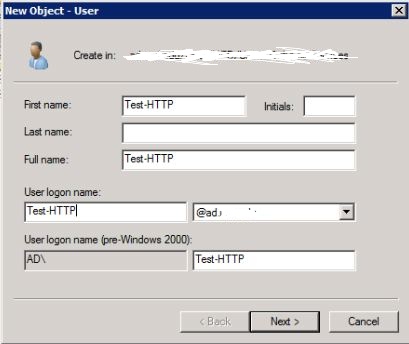
after hitting Next >, on the password page uncheck User must change password... and check Password never expires. Go ahead and enter anything as a password, it'll get changed to something random in a later step.
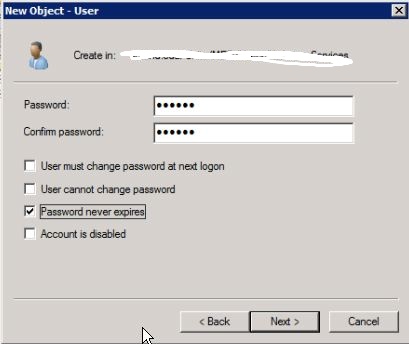
Go ahead and finish that up.
Next, we need to associate a Service Principal Name (SPN) with the User object we just created. Kerberos principals are usually <protocol>/<domain-name>@<kerberos-realm>. Since we're doing a web server, it'll be known in Kerberos as HTTP/test.foobar.edu@AD.FOOBAR.EDU Run this in a Command Prompt window:
setspn -A HTTP/test.foobar.edu Test-HTTP
(note that we left off the @AD.FOOBAR.EDU part, setspn knows to put that in)
Lastly, we're going to create a keytab file (I'll call it test-http.keytab), which holds encryption keys based on the User object's password. When a client requests a ticket to access our Linux box, AD will locate the User object based on the SPN we associated with it, and use the same encryption keys to create the Kerberos tickets our Linux's Apache will be setup to require.
(This is a one-line command, but I'm going to display it below as several lines for readability)
ktpass -out test-http.keytab
    -princ HTTP/test.foobar.edu@AD.FOOBAR.EDU
    -mapuser Test-HTTP
    -mapOp set
    +rndPass
    -crypto All
    -ptype KRB5_NT_PRINCIPAL
The +rndPass changes the User objects password to something random, you don't need to know what it is - the keytab is the thing you really care about here.
Securely copy that test-http.keytab to the Linux box, and delete it off the Windows machine. We're done with AD now, back to the real world...
Linux setup
Move the keytab file somewhere handy, such as /etc/apache2/test-http.keytab, and set the permissions so that the Apache process (and nobody else) has access:
chmod 440 test-http.keytab
chown www-data:www-data test-http.keytab
Install the Apache Kerberos module
aptitude install libapache2-mod-auth-kerb
You'll need an /etc/krb5.conf file. A simple one that leaves it up to Kerberos to discover what it needs might be as simple as:
[libdefaults]
default_realm = AD.FOOBAR.EDU
Here's a more explicit one that specifies Active Directory KDCs (Key Distrubution Centers), by IP
[libdefaults]
default_realm = AD.FOOBAR.EDU
default_keytab_name = FILE:/etc/krb5.keytab

[realms]
AD.FOOBAR.EDU = {
    kdc = 1.2.0.1
    kdc = 1.2.0.2
    kdc = 1.2.0.3
    default_domain = AD.FOOBAR.EDU
    }

[domain_realm]
.foobar.edu = AD.FOOBAR.EDU
That sort of thing is documented on the MIT website.
Apache Setup
We're in the home stretch now, Apache directives to protect a cgi-bin directory for example might look like:
ScriptAlias /cgi-bin/ /usr/lib/cgi-bin/
<Directory "/usr/lib/cgi-bin">
    AllowOverride None
    Options +ExecCGI -MultiViews +SymLinksIfOwnerMatch
    Order allow,deny
    Allow from all

    AuthName "FOOBAR Active Directory"
    AuthType KerberosV5
    KrbServiceName HTTP
    Krb5Keytab /etc/apache2/test-http.keytab
    require valid-user
</Directory>
Those last 5 lines inside the <Directory> block are the key here. The KrbServiceName of HTTP corresponds to what we entered as the protocol part of the principal name back on the setspn and ktpass commands. The AuthName is what will be displayed if the browser falls back to basic autentication if Kerberos is not available.
Test it out
Here's a super-simple CGI test.sh script we can put in our Kerberos-protected cgi-bin directory, be sure to make it executable.
#!/bin/sh
echo 'Content-Type: text/plain'
echo
echo You are: $REMOTE_USER
Go to a Windows client signed into Active Directory. To get IE or Chrome to attempt Kerberos authentication you'll have to add test.foobar.edu to the Local Intranet in the Internet Settings control panel. Here are some shots of where to go:
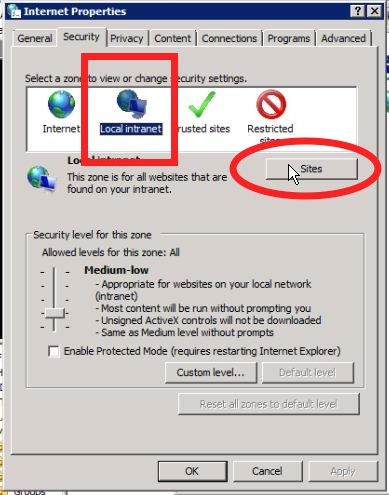
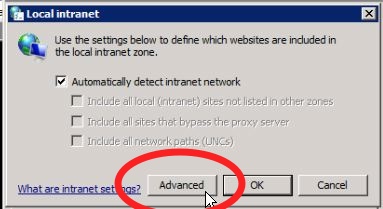
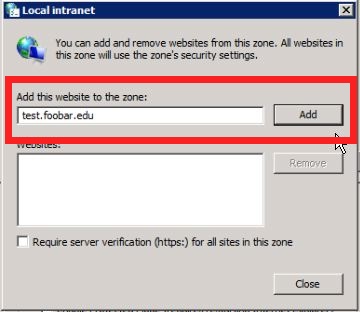
For Firefox, you'll want the NTLMAuth add-in, which lets you specify which domains that Firefox should attempt Kerberos authentication with.
Once you've got the browser fixed up, try accessing http://test.foobar.edu/cgi-bin/test.sh, and if everything works out, you should be rewarded with something like:
You are: bob.smith@AD.UND.EDU
If you didn't follow the steps to configure the browser to attempt Kerberos auth with the site, the browser should pop-up a userid/password box, and if you enter the correct info, it should show the same info.
Conclusion
So there you have it, after 15 minutes of work you can now have a webpage tell you what your own AD userid is. OK, it's probably more useful than that - you can now write webapps proxied behind Apache, such as a Django app, that just have to look at the REMOTE_USER variable to tell who's on the other end of the connection.
You'll probably not want to require Kerberos auth for the whole app, but all you really need is to require Kerberos for one particular login URL that sets your userid into a session, and leave it up to the framework to check the session for authentication on the rest of the site.